
Last updated on
Oct 31, 2026
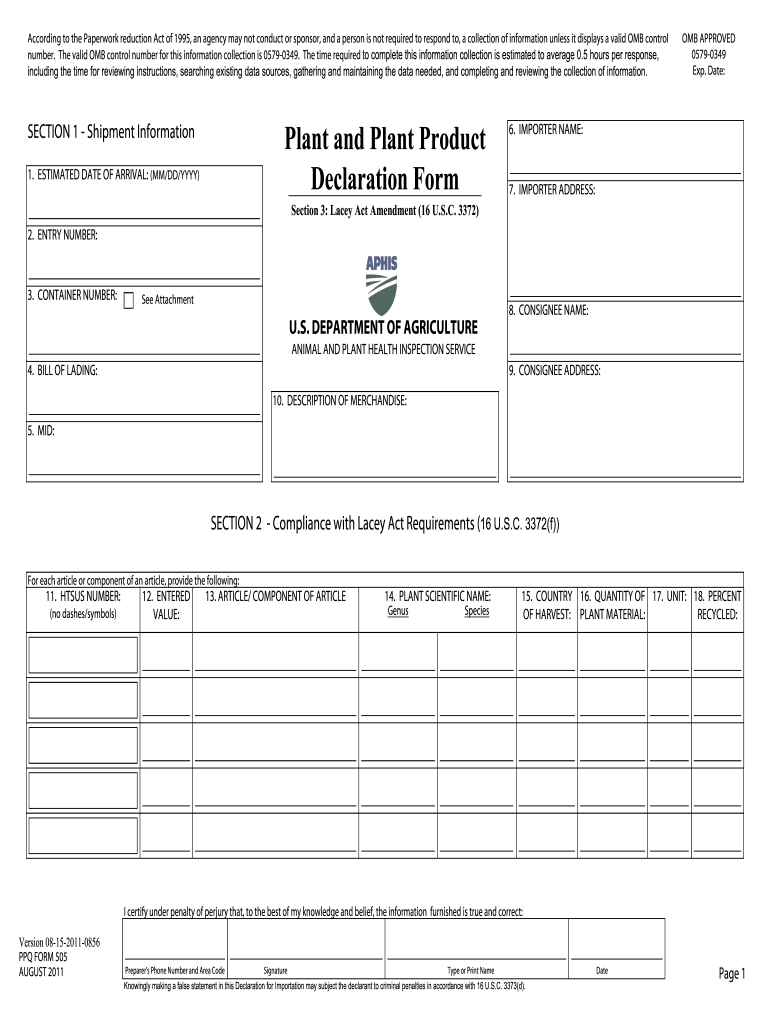
Get the free USDA PPQ 505 Declaration Form
We are not affiliated with any brand or entity on this form

Fill out
Complete the form online in a simple drag-and-drop editor.

eSign
Add your legally binding signature or send the form for signing.

Share
Share the form via a link, letting anyone fill it out from any device.

Export
Download, print, email, or move the form to your cloud storage.
Why pdfFiller is the best tool for your documents and forms


End-to-end document management
From editing and signing to collaboration and tracking, pdfFiller has everything you need to get your documents done quickly and efficiently.
Accessible from anywhere
pdfFiller is fully cloud-based. This means you can edit, sign, and share documents from anywhere using your computer, smartphone, or tablet.
Secure and compliant
pdfFiller lets you securely manage documents following global laws like ESIGN, CCPA, and GDPR. It's also HIPAA and SOC 2 compliant.
What is USDA PPQ 505 Declaration Form
The USDA PPQ 505 Declaration Form is a governmental document used by importers to declare plant and plant products for entry into the United States.
pdfFiller scores top ratings on review platforms




Everything I need to get the work completed quickly.
Excellent app, capable of doing more than I expected
Who needs USDA PPQ 505 Declaration Form?
Explore how professionals across industries use pdfFiller.

USDA PPQ 505 Declaration Form is needed by:
-
Importers of plant and plant products
-
Consignees of imported merchandise
-
Businesses adhering to the Lacey Act
-
Agricultural import compliance specialists
-
Customs brokers handling plant imports
-
Garden centers and nurseries importing goods
Comprehensive Guide to USDA PPQ 505 Declaration Form
What is the USDA PPQ 505 Declaration Form?
The USDA PPQ 505 Declaration Form is essential for importing plants and plant products into the United States. This form plays a crucial role in compliance with regulations set by the Lacey Act, which aims to protect U.S. forests and ecosystems. Required information on the form includes details about the importer and consignee, as well as specifics about the imported goods. By accurately filling out the USDA declaration form, you ensure seamless entry of your shipments while adhering to legal requirements.
Purpose and Benefits of the USDA PPQ 505 Declaration Form
The primary purpose of the USDA PPQ 505 Declaration Form is to facilitate compliance with federal regulations governing the importation of plant materials. This form provides several benefits to importers, leading to smoother processing of their shipments. Key advantages include:
-
Streamlined customs clearance
-
Legal protection against potential penalties
-
Improved organization of import documentation
Utilizing this form not only fulfills regulatory obligations but also enhances the efficiency of your import operations.
Who Needs the USDA PPQ 505 Declaration Form?
Importers of plants and plant products are the primary audience required to complete the USDA PPQ 505 Declaration Form. Specific scenarios necessitating the use of this form include:
-
Importing living plants
-
Bringing in plant-based products
-
Handling shipments that might impact U.S. agriculture
In such cases, users should ensure accurate completion to avoid delays or legal issues.
How to Fill Out the USDA PPQ 505 Declaration Form Online
Completing the USDA PPQ 505 Declaration Form online is straightforward with tools like pdfFiller. Here’s a step-by-step guide to assist you in the process:
-
Access the USDA PPQ 505 form via pdfFiller.
-
Fill in key fields such as Importer Name, Importer Address, Consignee Name, and Consignee Address.
-
Provide a detailed description of the merchandise, ensuring that all information is accurate.
-
Review the completed form for any errors before submitting.
-
Sign the document electronically, if required.
Following these steps will help ensure that your submission is processed without complications.
Key Features of the USDA PPQ 505 Declaration Form
The PPQ 505 Declaration Form includes several important features that assist users in completing their submissions. These features comprise:
-
Fillable fields for essential information like importer and consignee details
-
A signature line for certification by the importer
-
Options to print and download the completed form for your records
Utilizing these features effectively can enhance the accuracy and professionalism of your submission.
Common Mistakes When Filling Out the PPQ 505 Declaration Form
While filling out the USDA PPQ 505 Declaration Form, several common mistakes can lead to rejections or delays. Pay attention to the following potential errors:
-
Inaccurate details in the importer or consignee information
-
Omission of required fields
-
Failure to sign the form where necessary
Double-checking your information before submission can help avoid these issues and ensure a smoother import process.
Submitting the USDA PPQ 505 Declaration Form
There are various methods for submitting the USDA PPQ 505 Declaration Form, consisting of both online and traditional options. Users can choose from:
-
Online submission via approved platforms
-
Mailing a physical copy to the USDA
Be sure to check for any submission fees associated with your chosen method, and follow up to track the status of your form.
What Happens After You Submit the USDA PPQ 505 Declaration Form?
Once you’ve submitted the USDA PPQ 505 Declaration Form, the next steps entail a review process conducted by USDA officials. During this period:
-
Your form will be assessed for accuracy and compliance.
-
You will receive notifications regarding approvals or any issues needing resolution.
Understanding this process can help you prepare for subsequent actions if your submission must be amended.
Security and Compliance with the USDA PPQ 505 Declaration Form
Data protection is crucial when handling sensitive documents such as the USDA PPQ 505 Declaration Form. pdfFiller employs advanced security measures, including:
-
256-bit encryption for data security
-
Compliance with SOC 2 Type II, HIPAA, and GDPR standards
These security features are vital for ensuring the safe management of personal information during the form submission process.
Get Started with Your USDA PPQ 505 Declaration Form
Using pdfFiller for your USDA PPQ 505 Declaration Form is simple and efficient. With features tailored for ease of use, you can smoothly fill out and manage your documents. Sign up today to begin editing and completing your USDA declaration form online.
How to fill out the USDA PPQ 505 Declaration Form
-
1.Access pdfFiller and search for the USDA PPQ 505 Declaration Form using the search bar.
-
2.Open the form by selecting it from the search results.
-
3.Begin filling out the form by clicking on the fillable fields, starting with 'Importer Name' and 'Importer Address'.
-
4.Gather necessary details such as your contact information, consignee's details, and a comprehensive description of the merchandise you are importing.
-
5.Use the navigation tools within pdfFiller to scroll through the form, ensuring all required fields are complete.
-
6.Once all information is filled out, review each section carefully for accuracy.
-
7.If you have completed the form correctly, look for the signature field where you will certify the information provided.
-
8.Finalize the form by selecting the option to save or download it in your preferred format.
-
9.You can also submit the form directly through pdfFiller if you are required to do so by the USDA or use the download option to submit it via mail.

Who is eligible to use the USDA PPQ 505 Declaration Form?
Any importer or consignee of plant and plant products into the United States must complete the USDA PPQ 505 Declaration Form to comply with federal regulations.
What documents are required to complete the form?
You will need information such as the importer's name and address, consignee details, and a detailed description of the merchandise being imported. Ensure you have all necessary documentation beforehand.
How do I submit the completed USDA PPQ 505 Declaration Form?
The completed form can be submitted electronically via pdfFiller or printed out and mailed to the USDA, depending on their submission guidelines.
What common mistakes should I avoid when filling out the form?
Common errors include missing signatures, incorrect information about the consignee, and failure to provide a detailed description of the merchandise. Double-check all entries before submission.
Is there a deadline for submitting the USDA PPQ 505 Declaration Form?
While specific deadlines may vary, it is advisable to submit the form prior to your shipment's arrival to avoid delays at customs.
How long does it take to process the USDA PPQ 505 Declaration Form?
Processing times can vary depending on the complexity of the import and USDA workload, so plan for a potential wait time when submitting your declaration.
Do I need to notarize the USDA PPQ 505 Declaration Form?
No, the USDA PPQ 505 Declaration Form does not require notarization but must be signed by the importer to validate the information provided.
Related Content
Related Forms




Related Catalogs
Get the latest insights from our blog


If you believe that this page should be taken down, please follow our DMCA take down process
here
.
This form may include fields for payment information. Data entered in these fields is not covered by PCI DSS compliance.